
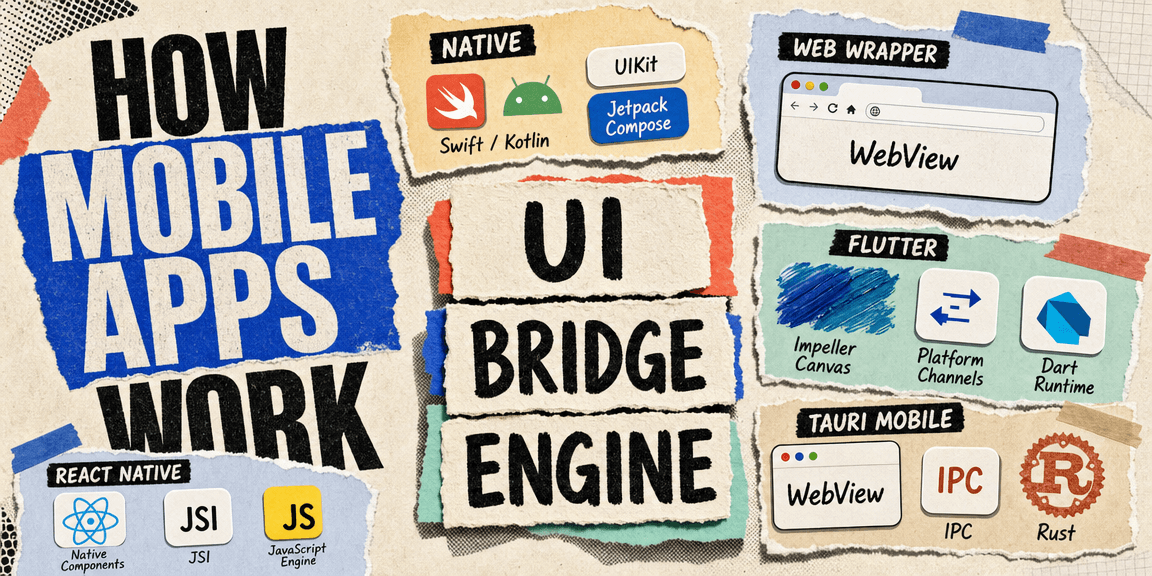
When you start looking into mobile development, the number of frameworks and approaches gets confusing fast. You hear about native apps, React Native, Flutter, Expo, Capacitor, Cordova, Ionic, Tauri mobile, and it is not always clear what makes them different. Are they all doing the same thing in different ways, or are some of them different architectures at the root?
The answer is both. There are three main ways to build a mobile app, and most of the frameworks you hear about fall into one of them. The differences are in what renders the UI, what runs the logic, and how the two talk to each other.
The Three Approaches
Here is the landscape:
| Approach | UI is rendered with | Logic runs in | Examples |
|---|---|---|---|
| Native | Platform UI components | Platform language | Swift/Kotlin apps |
| Web wrapper | WebView (browser) | JavaScript | Capacitor, Cordova, Ionic |
| Cross-platform | Varies (native, canvas, or WebView) | JS, Dart, or Rust | React Native, Flutter, Tauri |
The first thing to notice is that "cross-platform" is not one approach. It is a category, and inside it the UI rendering strategy is different for each framework. That is where most of the confusion comes from. People hear "cross-platform" and assume it means one thing. It does not.
Let me walk through each one.
Native Apps
This is the baseline. You write an iOS app in Swift or Objective-C, using UIKit or SwiftUI. You write an Android app in Kotlin or Java, using Android Views or Jetpack Compose. The code compiles to the platform's native binary, the UI is the platform's own UI components, and the logic runs directly on the platform runtime.
iOS:    Swift/SwiftUI  →  compiled  →  UIKit/SwiftUI renders to screen
Android: Kotlin/Compose →  compiled  →  Android Views/Compose renders to screen
The advantage is full access to everything the platform offers. Every API, every UI component, every platform-specific feature, every performance optimization. There is no bridge, no translation layer, no abstraction. The code you write is the code that runs.
The cost is that you write the app twice. An iOS app and an Android app are two completely separate codebases, in two different languages, with two different UI frameworks, two different build systems, and two different deployment targets. If you want a feature on both platforms, you build it twice.
This is where the other two approaches come from. The web wrapper and cross-platform categories both exist because writing everything twice is expensive.
Web Wrappers
The web wrapper approach takes a web app and puts it inside a native shell. Capacitor (from Ionic) and Cordova are the main frameworks here.
HTML/CSS/JS → WebView → native shell → OSThe UI is a WebView. That is a browser engine, the same one the system uses when you open a link inside an app. On iOS it is WKWebView, on Android it is the Android WebView. Your JavaScript runs inside that WebView, just like it runs inside a browser tab. The native shell around it provides a bridge so your JavaScript can call platform APIs, access the camera, read the filesystem, show native notifications, and so on.
If you have read the Tauri introduction, this structure should look familiar. Tauri on desktop uses the same pattern: web UI inside a native window, with a bridge to the OS. The difference is the backend. Capacitor and Cordova bridge to the platform's native language (Swift or Kotlin), written per platform. Tauri bridges to Rust, compiled natively for each mobile target.
The appeal of the web wrapper is obvious. If you already have a web app, you can ship it as a mobile app without rewriting your UI. The same HTML, CSS, and JavaScript that runs in a browser runs inside the WebView. You write one frontend, and it works everywhere.
The tradeoff is performance and native feel. A WebView is a browser. It renders HTML to a screen, the same way a browser does. Native UI components are faster, smoother, and feel like the platform in ways a WebView does not always manage. Scrolling physics, gesture handling, transitions, and input behavior are all subtly different inside a WebView than they are in a native UI. For some apps that does not matter. For others it is the whole game.
Cross-Platform Frameworks
This is where it gets interesting, because "cross-platform" means different things for different frameworks. Each one picks a different UI rendering strategy and a different bridge mechanism.
React Native
React Native does not render to a WebView. Your React components describe a native UI, and React Native creates actual native iOS and Android views for you. A View becomes a UIView on iOS and an android.view.View on Android. There is no browser, no HTML, no DOM.
React components → JSI bridge → native UI components → screenThe logic runs in JavaScript, on a JavaScript engine embedded inside the app. The bridge between JavaScript and native is called JSI (JavaScript Interface). It allows JavaScript to call directly into native C++ objects, which is faster than the older bridge that serialized everything to JSON.
If you want the full deep dive on React Native and Expo, I wrote about that here. The short version for this post is: the UI is native, the logic is JavaScript, and the bridge is JSI.
Flutter
Flutter takes a different approach to the UI. It does not use native UI components, and it does not use a WebView. Flutter has its own rendering engine, called Impeller (formerly Skia), which draws directly to a canvas. Every pixel on the screen is painted by Flutter's own engine.
Flutter widgets → Dart runtime → Impeller renders to canvas → screenThe logic runs in Dart, which is compiled to native ARM code for the target platform. The bridge between Dart and platform APIs is called Platform Channels. When Flutter needs to call a platform API, say the camera or the filesystem, it sends a message through a Platform Channel to native code that handles the request.
The appeal is consistency. Because Flutter draws its own UI, a Flutter app looks and behaves identically on iOS and Android. There is no "this looks like an Android app on iOS" problem, because the UI is not using either platform's components. The tradeoff is that a Flutter app does not automatically adopt the platform's look and feel. If you want it to feel native, you have to build that yourself.
Tauri Mobile
Tauri mobile is the newest of the three, and it combines the web wrapper's UI approach with a Rust backend instead of a native-language backend.
HTML/CSS/JS → WebView → Tauri IPC → Rust → OSThe UI is a WebView, same as Capacitor and Cordova. The difference is the backend. Instead of bridging to Swift or Kotlin code written per platform, Tauri bridges to Rust, which is compiled natively for each mobile target. One Rust codebase handles the native side for both iOS and Android.
This is where the one codebase pattern becomes useful. The same interface-and-implementation strategy that lets a Tauri desktop app share code with a web frontend applies to mobile too. Your service interfaces stay the same, and you add a mobile implementation alongside the web and desktop ones.
The Shared Pattern
Here is the part that made the whole landscape come together for me. All three cross-platform frameworks follow the same architecture:
   UI
    |
  Bridge
    |
  Engine
The UI is the presentation layer. The bridge is the communication mechanism. The engine is the runtime that does the actual work. The technology changes, but the shape is the same.
| Framework | UI | Bridge | Engine |
|---|---|---|---|
| React Native | Native components | JSI | JavaScript engine |
| Flutter | Impeller canvas | Platform Channels | Dart runtime |
| Tauri mobile | WebView | IPC | Rust |
Once you see that pattern, the differences between the frameworks stop being confusing. They are all variations on the same shape. React Native picks native UI and JSI. Flutter picks its own canvas and Platform Channels. Tauri picks a WebView and IPC to Rust. The choice is about which tradeoffs you accept for the UI layer and which bridge mechanism you want to use to reach the platform.
How to Choose
The question is not which framework is best. It is which tradeoffs fit your app.
Native (Swift/Kotlin) if you need full platform access, maximum performance, or a UI that feels completely native on each platform. The cost is maintaining two codebases.
React Native if you want native UI components driven by JavaScript, and you already have a React team or want to share logic with a React web app. The UI is native, the logic is JavaScript, and you write one codebase that targets both platforms.
Flutter if you want pixel-perfect consistency across platforms and you are willing to build the native look and feel yourself. The UI is Flutter's own rendering, the logic is Dart, and the app looks identical on iOS and Android by default.
Tauri mobile if you already have a web frontend and a Rust backend, or if you want to extend a Tauri desktop app to mobile without changing your stack. The UI is a WebView, the backend is Rust, and the same codebase can target desktop and mobile.
Web wrapper (Capacitor/Cordova) if you already have a web app and you want to ship it on mobile with minimal changes, and you can accept the WebView tradeoffs around performance and native feel.
The Bigger Picture
Most cross-platform frameworks, and most modern app architectures in general, follow the UI, Bridge, Engine pattern. The UI is what the user sees. The bridge is how the UI talks to the engine. The engine is what does the work. Whether you are building a mobile app, a desktop app, or a web app, that shape shows up.
The technology changes. The architecture does not. Once you can see the shape, you can evaluate any new framework by asking three questions: what renders the UI, what runs the logic, and how do they communicate. Everything else is detail.
Read more

Architecting Reliable Mobile Billing
A real-world look at fixing mobile subscription billing when webhooks, sandbox purchases, and user identity break down.
React Native and Expo, Explained Simply
Understand how React Native and Expo really work, from native builds to OTA updates and development workflows.
![Meet Tauri [2.0]](/thumbnails/tauri-guide.png)
Meet Tauri [2.0]
How Tauri builds desktop apps from web technologies, where it puts the trust boundary compared to Electron, and the mindset shift from a website in a window to a native application.