
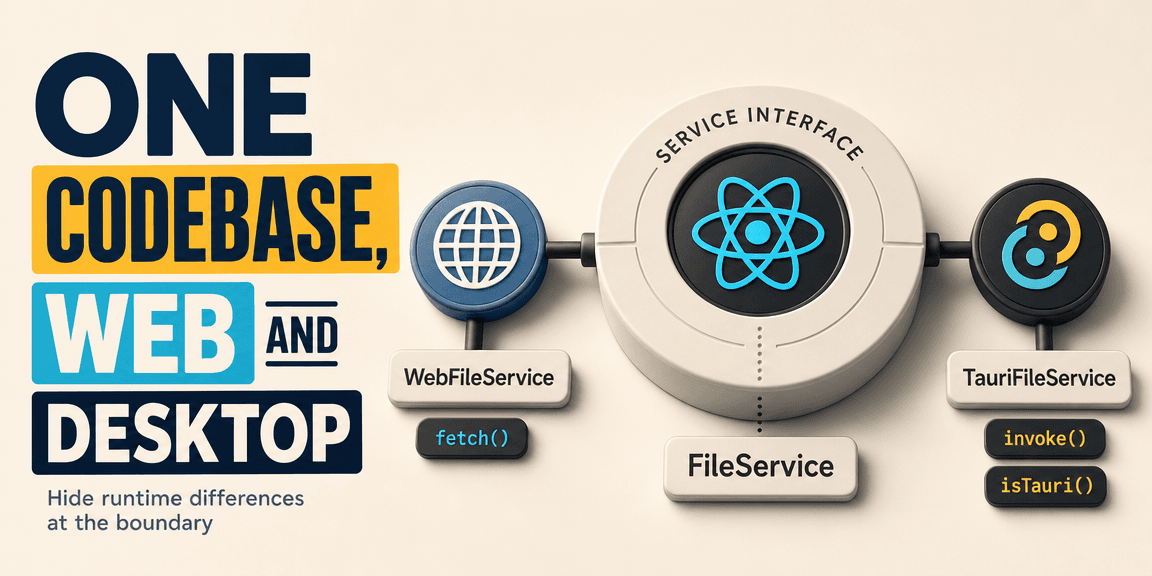
If you read the Tauri introduction, you know what Tauri is and how it works: a native desktop app where the UI is web technology and a Rust backend handles the operating system side through IPC. The next question that usually comes up is: how do you write one codebase that runs both there and in a regular browser?
That question shows up early. Your React components need to read and write files, show notifications, and talk to the operating system. In Tauri, all of that goes through invoke() and the Rust backend. But you also want to run the same frontend in a browser during development, or ship it as a web app alongside the desktop version. In the browser, invoke() does nothing. There is no Rust on the other end.
The naive approach is to sprinkle isTauri() checks throughout your components. One component calls invoke() when it is in Tauri and fetch() when it is in the browser. Another does the same for notifications. A third for file saves. After a while, every component knows about both runtimes, and the code is full of branches that do different things depending on where the app is running.
That works, but it scales badly. Every new component that needs a native capability has to learn the same lesson. Every component carries the weight of two runtimes. And the moment you want to add a third runtime, say a mobile build, you are editing components again.
There is a better shape for this.
Put the Runtime Behind an Interface
The pattern is to stop letting your components know about the runtime. Instead, you define an interface, and you swap the implementation based on where the app is running.
Take file operations. Your components need to save documents, read files, and list directories. Define what that looks like without caring how it happens:
interface FileService {
  saveDocument(doc: Document): Promise<void>;
  getFiles(): Promise<string[]>;
  readFile(path: string): Promise<string>;
}
Your React components depend on this interface. They never call invoke(). They never call fetch(). They call fileService.saveDocument(doc) and move on.
function SaveButton({ doc }: { doc: Document }) {
  const fileService = useFileService();

  return (
    <button onClick={() => fileService.saveDocument(doc)}>
      Save
    </button>
  );
}
The component does not know if that save is going to Rust, to an HTTP API, or to a mock in a test. It does not need to know.
Two Implementations
You write two implementations of that interface. One for the browser, one for Tauri.
The browser version talks to your backend over HTTP:
class WebFileService implements FileService {
  async saveDocument(doc: Document): Promise<void> {
    await fetch("/api/documents", {
      method: "POST",
      body: JSON.stringify(doc),
    });
  }

  async getFiles(): Promise<string[]> {
    const res = await fetch("/api/files");
    return res.json();
  }

  async readFile(path: string): Promise<string> {
    const res = await fetch(`/api/files/${encodeURIComponent(path)}`);
    return res.text();
  }
}
The Tauri version sends messages to Rust through invoke():
class TauriFileService implements FileService {
  async saveDocument(doc: Document): Promise<void> {
    await invoke("save_document", { doc });
  }

  async getFiles(): Promise<string[]> {
    return invoke<string[]>("get_files");
  }

  async readFile(path: string): Promise<string> {
    return invoke<string>("read_file", { path });
  }
}
Same interface, two completely different mechanisms underneath. One goes over the network. The other goes through IPC to a compiled Rust function that writes to the actual filesystem.
Pick One at the Boundary
You pick the implementation once, at the boundary where your app starts up, and everything downstream gets the right one:
function createFileService(): FileService {
  if (isTauri()) {
    return new TauriFileService();
  }
  return new WebFileService();
}
Or with a provider, if you prefer React context:
const FileServiceContext = createContext<FileService>(
  isTauri() ? new TauriFileService() : new WebFileService()
);

function useFileService(): FileService {
  return useContext(FileServiceContext);
}
Now every component in the app gets the right implementation without ever knowing which one it is. The isTauri() check happens in one place. The components are clean.
What Gets Shared, What Gets Swapped
This pattern works because most of your application does not care about the runtime. The UI, the state management, the business rules, the validation, the routing, the component tree, all of that is identical regardless of where the app is running.
| Shared | Swapped |
|---|---|
| Components | File access |
| State management | Notifications |
| Business rules | OS integrations |
| Validation | Authentication method |
| Routing | Storage |
| Component tree | Network layer |
The shared column is most of your codebase. The swapped column is the surface where your app touches the outside world, and that surface is where the runtime actually matters. By putting each swapped piece behind an interface, you keep the runtime differences in one place instead of spread across every component.
Why This Is the Right Pattern for Tauri
Tauri does not give you this for free. If you just start calling invoke() in your components, you end up with a desktop app that happens to contain web code. It will not run in a browser anymore, because every component depends on the Rust bridge being there. You have locked your frontend to the desktop runtime.
The interface pattern inverts that. You get a web app that can become a desktop app, because the web app was built without knowing about the desktop runtime. The desktop capabilities were added at the boundaries, and the core application never depended on them.
That distinction matters for more than just running in a browser. It means you can test your components in isolation, because they depend on an interface, not on invoke(). It means you can add a new runtime without touching components, by writing a new implementation of the interface. It means the decision of "is this a web app or a desktop app" is a configuration choice, not a structural one.
A Real Example
Say you are building a note-taking app. In the browser, notes are saved to your backend API. In Tauri, notes are saved to the local filesystem through Rust. The UI is the same in both: a list of notes, an editor, a save button.
                    SaveButton
                        |
                  FileService (interface)
                   /            \
                  /              \
    WebFileService          TauriFileService
         |                        |
    HTTP POST /api/notes    invoke("save_note")
         |                        |
    Backend server            Rust function
         |                        |
    Database                 Local filesystem
The SaveButton does not know which side it is on. The Editor does not know. The NoteList does not know. The only thing that knows is the one line of code that picks the implementation when the app starts.
When the user clicks save in the browser, the request goes to your backend. When they click save in the desktop app, the request goes to Rust, which writes to disk. The component code is identical. The experience is different. The storage location is different. The trust boundary is different. But the React code that the user interacts with is the same.
Where to Draw the Lines
The interfaces you define should match your application's needs, not the runtime's capabilities. Do not create a TauriService that wraps every invoke() call. That is just moving the problem. Create a FileService for file operations, a NotificationService for notifications, an AuthService for authentication. Each interface describes what your application needs to do, and each runtime provides its own implementation of that need.
The question to ask when deciding whether something goes behind an interface is: does this work differently in the browser than it does in Tauri? If yes, it goes behind an interface. If no, it is shared code and both runtimes use the same implementation.
File access is different. Notifications are different. OS integrations are different. Form validation is the same. State management is the same. Routing is the same. The line is drawn by where the runtime actually diverges, and once you draw it, the divergence lives in one place.
Read more
Design Tokens, DESIGN.md, and Design to Code
What design tokens actually do (and what they do not), how DESIGN.md became the format AI agents read, and how the design-to-code movement is changing the handoff from design to production code.
![Meet Tauri [2.0]](/thumbnails/tauri-guide.png)
Meet Tauri [2.0]
How Tauri builds desktop apps from web technologies, where it puts the trust boundary compared to Electron, and the mindset shift from a website in a window to a native application.

Architecting AI Gateway Budgets: Virtual Keys, Provider Keys, and Distributed Quota Enforcement
A blueprint for designing a global AI quota system. How to separate request execution from budget truth under high concurrency.